Vibe Coding with Gemini
Building Tic Tac Toe with the Gemini CLI
2025-07-16

Image generated by Imagen 4
Disclaimer
While I am somewhat critical of Gemini in this post, this is not a condemnation. I have used the Gemini CLI to help me with many other projects. It helped me template out endpoints in Resumly.pro, and modify UI in other projects. It is a great tool, and is very helpful.
This was meant to be a test of how well it performs against someone who may have never programmed before, and test the gemini-2.5-pro model performance.
Overview
I was bored this weekend and decided to test the new Gemini CLI.
I have used Svelte for only one frontend project before, so I thought it would be a good opportunity to try it out again. I also wanted to see how well Gemini could handle a simple game like Tic Tac Toe.
Getting Started
I set up the Gemini CLI previously, but if you haven't, run this command to install it:
# Assuming you have Node.js installed
npm install -g @google/gemini-cli
I was thinking about setting up the project, and then letting Gemini handle the rest, but I decided to let it handle the entire project setup. I ran the following command:
gemini
To get the whole vibe coding experience, I just gave is a simple prompt.
Create a tic tac toe website in svelte. Create a new folder for this project. The game should have an easy, medium, and hard mode, and you should be able to play against the computer, or someone else. Make sure the user can select all of those options. Use SCSS for styling, and make the game look modern. It should also be responsive for mobile devices.
I wanted to see how it performed, and so I let it run. I approved all code changes and shell commands it suggested, without reviewing them too closely (for better or worse). I wanted to see how well it could handle the task without much intervention.
Process
It started by creating a new folder called tic-tac-toe, and then it initialized a new Svelte project using Vite. It also set up SCSS for styling. Good start. It started making some changes to the files and directories, and I let it do its thing.
svelte-tic-tac-toe/
├── public/
│   ├── favicon.svg
│   ├── gemini-usage.png
│   └── vite.svg
├── src/
│   ├── lib/
│   │   ├── Board.svelte
│   │   ├── Cell.svelte
│   │   ├── computerPlayer.ts
│   │   ├── game.ts
│   │   ├── GameStatus.svelte
│   │   ├── Options.svelte
│   │   ├── ThemeToggle.svelte
│   │   ├── theme.ts
│   │   └── types.ts
│   ├── App.svelte
│   ├── app.scss
│   └── main.ts
├── index.html
├── package.json
├── svelte.config.js
├── tsconfig.json
└── vite.config.ts
After a while, it had created the basic structure of the game, including the game board, player selection, and difficulty levels, all in different components. It also added some basic styling using SCSS.
It then started implementing the game logic, which was impressive. It created a simple AI for the computer player, and it allowed you to play against it or another player. The AI was basic but functional, and it could play at different difficulty levels.
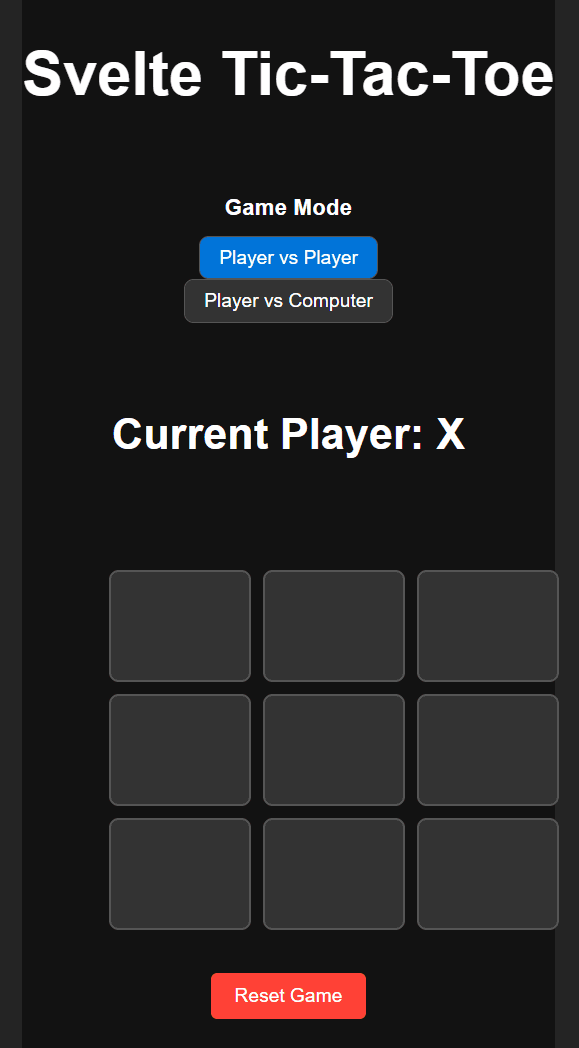
I asked for a responsive design, and it delivered. The game worked on mobile devices, and the layout adjusted nicely to different screen sizes. That being said, it was wonky in some places, and is definitely not perfect.
Cherry on top
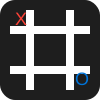
After all that I asked it to generate a new favicon. It made the following svg, and update the title of the page. By no means a masterpiece, but it was a nice touch.
Wrapping Up
It didn't ask any clarifying questions, but that was expected since the instruction were pretty clear. It took about 10 minutes to complete the project, which is impressive. I noticed a few UI bugs where the squares would change size when you clicked on them. This resulted in a some of them going off the screen on mobile devices.
I pointed out the UI bugs to the CLI:
There are some UI bugs. For example, the game board goes out of the main tag after a board section has been populated with an X or a Y. When the board is full, the reset game button also appears on top of the board. Fix these UI bugs
After about 2 minutes, it came back with a fix, but to my disappointment, nothing had changed.
While the UI was a good start, it was not great by any means, had quite a few problems. A friend noted that it looked like a first year developer made it.
I later asked it to implement a dark mode toggle, and it did it with a transition effect, which was nice.
Usage
After you are finished and you enter /quit you get the following usage information from you session:
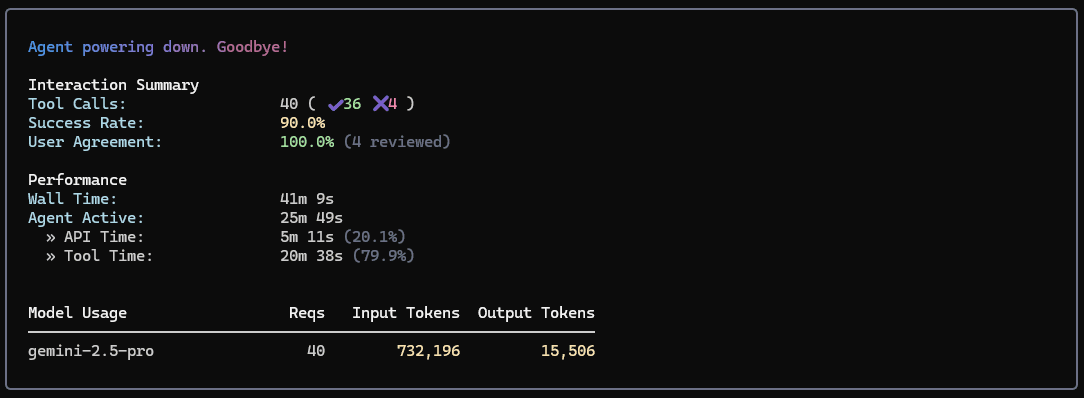
According to the price of gemini-2.5-pro, this project cost me about $1.08 if you average the 700,000+ tokens across the 40 listed tool calls. However, even if we assume that the calls were more than 200,000 tokens, it would still only cost about $2.06 in total.
For an app, this is pretty cheap, and I would say that it is worth it. The CLI is a great tool for quickly prototyping ideas, and it can save you a lot of time. That being said, you will need to do some manual work to fix the UI bugs and polish the app. It might also help if you review the changes it makes, rather than just approving them all, like I did.
Evaluation
- Time: 4/5 - Fast for a model as big as 2.5 pro
- Quality: 3/5 - Good, but needs polishing and review
- Cost: 5/5 - Very affordable
Credit where credit is due, the Gemini CLI did a great job at creating a basic Tic Tac Toe game in Svelte. It was able to handle the project setup, game logic, and responsive design with minimal intervention.
One note on the cost. I mentioned above that it cost me about $1.08. This would be if I was on the paid tier. Google deserves more credit for how generous their free tier of Gemini is. In Gemini CLI release article, they also mentioned that users of their CLI get 60 requests per minute, and 1,000 requests per day.
I was going to do a similar test with Claude, but their costs are much higher, and there is no free tier for their CLI, Claude Code. This is a greater barrier to entry for many people, especially those who are just starting out with AI and programming.